 EN
EN
How to Adjust the Generator Governor for Sensitive Load Applications
When a generator powers a hospital, data center, or precision manufacturing line, frequency stability is a hard requirement. A generator governor that performs well under variable construction loads can cause equipment faults, data loss, or operational shutdowns when connected to sensitive loads. The difference typically comes down to how the control system has been configured, not which brand of unit is installed.
This guide covers how to adjust a generator governor specifically for sensitive load environments, covering operating mode selection, droop settings, gain, and stability tuning.
What Sensitive Loads Require
Sensitive loads are defined by tight tolerance for frequency and voltage deviation. A well-configured speed control system for these environments must maintain output frequency within ±0.5 Hz during load changes. Common sensitive load categories include:
- Medical equipment (imaging systems, surgical devices, life support): frequency deviation below ±1 Hz, voltage within ±5% of nominal.
- Data centers and server rooms: larger frequency fluctuations trigger UPS alarms or bypass events that increase system risk.
- Precision CNC and electronics manufacturing: motor drives and control systems are sensitive to frequency instability during load transitions.
- Telecommunication infrastructure: rectifier and battery charging systems require stable input frequency for predictable operation.
Governor Types and Operating Modes
Before adjusting the generator governor, identify whether it is a mechanical or electronic unit, since the two types require different adjustment approaches.
A mechanical unit uses centrifugal flyweights to sense engine speed. Adjustments are made through spring tension and linkage geometry. These are common on diesel generator sets, though they have inherent limits in response precision.
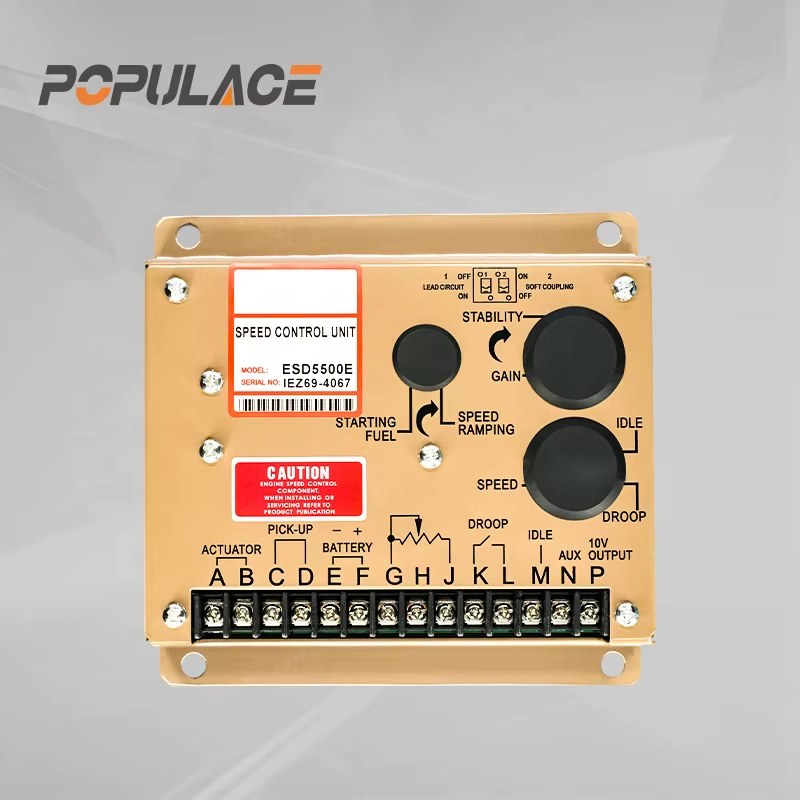
An electronic generator governor uses a magnetic pickup sensor to detect engine speed and drives a fuel actuator via electronic output; this type supports software-configurable droop, gain, and stability settings — an advantage when serving generator sets with sensitive load requirements.
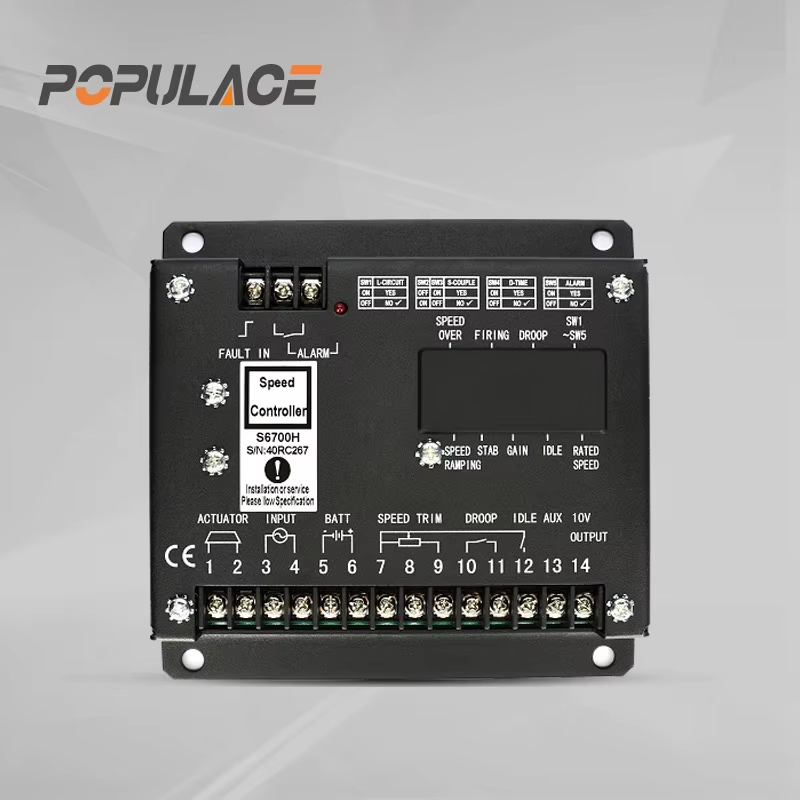
Both types support two primary operating modes:
- Droop mode: The control system intentionally allows engine speed to decrease as load increases. A 4% droop setting is standard for parallel generator configurations. For a single diesel generator governor in a sensitive load application, droop should be reduced toward zero.
- Isochronous mode: The unit continuously corrects to maintain rated speed regardless of load variation. A properly tuned isochronous generator speed governor maintains frequency within ±0.5 Hz during load steps — the recommended mode for a single unit serving sensitive loads.
Faster response does not consistently produce better outcomes. An overly aggressive gain setting causes speed hunting — a cyclic RPM oscillation that produces frequency ripple on the output. Controlled, stable recovery is the goal, not maximum correction speed.
Pre-Adjustment Checks
Before adjusting the generator governor, verify these conditions to avoid misdiagnosing a settings problem as a hardware fault:
- Inspect the fuel system. Speed hunting on a diesel generator governor is rarely caused by the control device alone. Fuel line restrictions, a worn injector pump, or air in the fuel circuit produce instability that no adjustment can compensate. Verify that fuel pressure is within specification at rated load.
- Check the actuator linkage. Worn or loose throttle linkage introduces lag that destabilizes any governor for generator. Tighten all connections and verify full travel without binding.
- Verify the magnetic pickup. For an electronic generator governor, the gap must be set to the manufacturer's specified clearance, typically 0.5–1.0 mm from the ring gear tooth. An incorrect gap produces a noisy speed signal that mimics instability.
- Warm up the engine. Avoid adjusting the system on a cold engine. Reach operating temperature (15–20 minutes at light load) before making changes.
Step-by-Step Adjustment Procedure
This procedure applies to an electronic generator governor with adjustable droop, gain, and stability controls. For a diesel generator governor with mechanical-only adjustment, apply the spring tension specifications from the manufacturer's documentation.
Step 1: Set Base Speed (No-Load RPM)
With the unit at no load and operating temperature, set engine speed to rated RPM: 1500 RPM for a 50 Hz, 4-pole machine; 1800 RPM for 60 Hz. Use a calibrated frequency meter rather than the panel display alone. Adjust the speed reference trimmer until the output reads exactly rated frequency at no load.
Step 2: Configure Isochronous Mode
For a single generator governor serving sensitive loads, set droop to zero or minimum. This enables isochronous operation: speed is held constant at all load levels. If the droop control is percentage-graduated, start at 4% and reduce in steps toward 0% while testing stability at each position.
For parallel generator sets, do not set droop to zero. Parallel load sharing requires non-zero droop across all units. For parallel configurations serving sensitive loads, review the load-sharing controller documentation before adjusting individual unit settings.
Step 3: Adjust Gain (Sensitivity)
Gain controls how aggressively the generator governor responds to a speed error. Start at mid-range. Apply a 25% step load and observe frequency recovery:
- Recovery slower than 3–5 seconds: increase gain in small increments.
- Frequency oscillates after the load step: gain is too high — reduce it.
- Target: clean recovery to within ±0.5 Hz within 1–2 seconds of a step load.
Step 4: Adjust Stability (Damping)
Stability controls how quickly the system reduces its correction as it approaches setpoint. A low stability setting causes overshoot and oscillation; too high causes slow recovery. With gain set, fine-tune stability until a full load step produces a single clean frequency dip, recovering to within ±0.5 Hz without oscillation above nominal.
Step 5: Verify Under Actual Load Conditions
After completing test load bank adjustments, connect the actual sensitive load and repeat load tests. Medical imaging systems and large UPS equipment have inrush profiles that differ from resistive test loads. Confirm that the generator speed governor holds its tuned behavior under real conditions before releasing the system to service. Document all final control settings for future reference.
Troubleshooting Persistent Instability
If speed instability continues after completing all adjustments, check these before replacing the unit:
- Fuel delivery restriction at load. The control system cannot compensate for inadequate fuel supply. Check filters, injectors, and pump condition.
- Actuator condition. A sticking actuator introduces response lag that destabilizes the control loop regardless of gain or stability settings.
- Magnetic pickup signal quality. Use an oscilloscope to verify clean pickup output at rated speed. Damaged ring gear teeth or adjacent cable interference can simulate governor instability.
- Load type characteristics. Variable frequency drives and large motor starters impose current transients that interact with generator speed governor response. Soft-start or load sequencing may resolve instability that only appears with specific load types.
Ongoing Maintenance
A correctly adjusted governor for generator sets serving sensitive loads must be re-verified on a regular maintenance schedule. Engine wear, fuel system changes, and actuator aging shift dynamic response over time. Establish a frequency response baseline using a data logger during a standardized load step, then compare it at each annual service interval.
When sourcing a replacement electronic generator governor or diesel generator governor component, request model-specific parameter documentation for your engine family rather than relying on generic cross-reference charts. Suppliers specializing in generator control components — governors, AVRs, and actuators — can provide installation and configuration guidance that general parts distributors often cannot.
Summary
Adjusting a generator governor for sensitive load applications involves confirming fuel and actuator integrity before any changes; configuring isochronous mode for single-unit sensitive load use; tuning gain for fast load recovery; and adjusting stability to eliminate frequency oscillation. A well-tuned generator speed governor should maintain output frequency within ±0.5 Hz under step load changes — the baseline standard for environments where frequency deviation directly affects connected equipment performance.